
CCTV5海外地区限制怎么解除?海外党看世界杯、玩国服游戏的一站式加速指南
Living abroad, nothing stings more than pulling up CCTV5 to watch the World Cup final—only to be greeted by a "region not supported" message. Or trying to catch Migu Video’s exclusive match highlights, just to hit a wall of buffering and error codes. And if you’re a die-hard fan of 国服 games like Genshin Impact or Honor of Kings, the lag and disconnections can turn your gaming session into a frustrating mess. So, CCTV5海外地区限制怎么解除?The root cause is simple: most Chinese streaming platforms and game servers block non-Chinese IPs due to licensing agreements and regional optimization rules. But the solution isn’t complicated—using a reliable accelerator like Tomato Accelerator can fix both your video streaming and gaming woes in one go. This guide will walk you through why these restrictions exist, how to pick the right accelerator, and exactly how to use Tomato to unblock CCTV5, watch World Cup without limits, and play 国服 games smoothly.
Why Can’t You Access CCTV5 or Play 国服 Games Overseas?
When you’re outside China, your IP address acts like a digital passport—it tells platforms where you are. For streaming services like CCTV5 and Migu Video, licensing deals mean they can only show content to users within China’s borders. So if your IP is from the US, Europe, or any other country, you’ll get that annoying region error. For 国服 games, the servers are optimized for Chinese IPs; overseas connections take longer routes, leading to high ping (latency) and frequent disconnections. Free VPNs might seem like a quick fix, but they often have slow speeds, limited data caps, or get blocked by platforms within days. That’s where a specialized accelerator like Tomato comes in.
How to Choose the Right Accelerator for Overseas Users
Not all accelerators are created equal. For overseas users, you need one that handles both streaming and gaming, with features tailored to your needs. Here’s what to look for—and how Tomato checks all the boxes:
Global Nodes & Smart Optimal Routes
Tomato has hundreds of nodes spread across North America, Europe, Asia, and more. Its smart algorithm scans all available routes in real time and picks the fastest one for your activity—whether you’re streaming CCTV5’s World Cup coverage or playing a fast-paced game like League of Legends 国服. No more manually switching lines; it does the work for you, ensuring the lowest possible latency and buffering.
Multi-Platform Support for All Your Devices
Overseas life means juggling multiple devices: a phone to watch Migu Video on the commute, a PC to play 国服 games at home, a tablet to catch CCTV5’s highlights before bed. Tomato supports Android, iOS, Windows, and Mac—so you can use it on every device you own. Best of all, one account lets you connect multiple devices at the same time. No need to log out of your phone to play on your PC; you can stream and game simultaneously.
Stable Unlimited Data & Specialized Lines
Imagine missing a World Cup goal because your data cap ran out, or losing a game due to sudden lag. Tomato offers unlimited traffic—so you never have to worry about cutting your stream short or pausing your game. Its smart分流 technology separates your streaming and gaming traffic, so watching CCTV5 doesn’t slow down your game, and vice versa. Plus, it has dedicated lines for returning to China content: 100M exclusive bandwidth for games and streaming, so you get smooth, high-definition playback every time.
Data Security & Encrypted Transmission
Overseas users often worry about data privacy. Tomato uses advanced AES-256 encryption to protect your data during transmission—so your online activities are safe from prying eyes. Its专线传输 ensures that your connection is direct and secure, with no middlemen involved. You can stream and game with peace of mind, knowing your data is protected.
24/7 After-Sales Support
What if your connection drops during the World Cup final? Or your game lag spikes right before a crucial match? Tomato’s professional technical team is available 24/7 to help. Whether it’s a line issue, a setup question, or a buffering problem, they’ll get you back online in minutes. No more waiting for business hours—support is always there when you need it.
Step-by-Step Guide to Using Tomato Accelerator
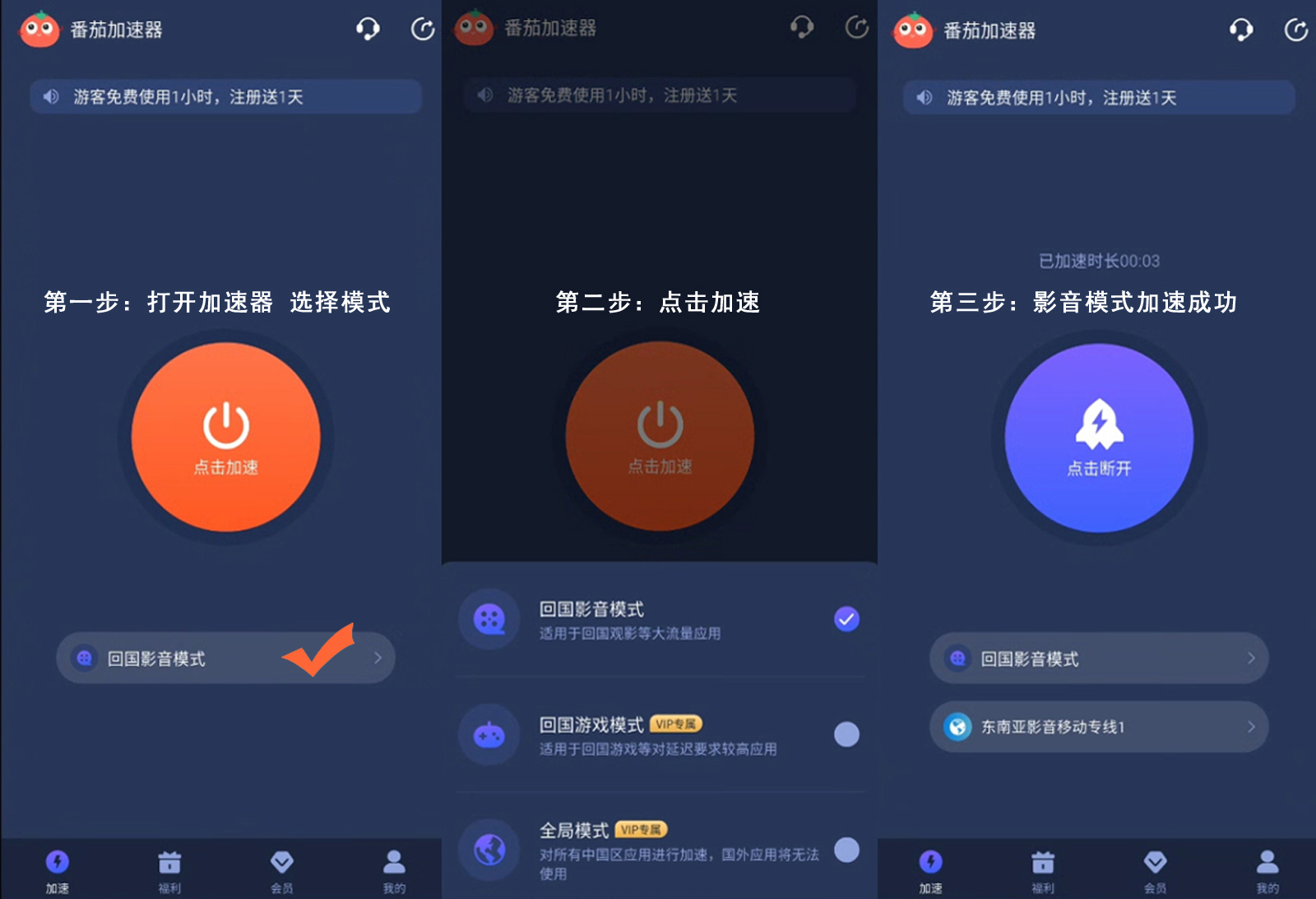
Using Tomato is straightforward, even if you’re not tech-savvy. Here’s how to get started:
1. **Download Tomato**: Go to the official Tomato Accelerator website or your device’s app store (Google Play, App Store, Windows Store, or Mac App Store) and download the app.
2. **Sign Up/Log In**: Create a new account or log in with your existing one. You can choose a subscription plan that fits your needs—monthly, quarterly, or annual.
3. **Select Your Service**: Open the app and pick the service you need. For CCTV5 or World Cup streaming, choose the "回国影音专线" or "CCTV5专属专线". For 国服 games, select the specific game line (like "Genshin Impact 国服" or "Honor of Kings"). For Migu Video, use the "Migu Video专线" to avoid region restrictions.
4. **Connect**: Click the "Connect" button. Once connected, your IP will be optimized to access Chinese content—no more region errors.
5. **Enjoy**: Open CCTV5’s website or app, Migu Video, or your favorite 国服 game. You’ll be able to watch the World Cup without buffering or play games with low ping.
Common Issues & Quick Fixes
Even the best accelerators can have minor issues. Here are some quick fixes for common problems:
- **Buffering on CCTV5**: If your stream is buffering, try switching to a different "回国影音专线" in Tomato. Sometimes certain nodes are busier than others, so a quick switch can improve speed.
- **High Ping in Games**: Select the game-specific line instead of a general one. Tomato’s smart algorithm might also suggest a better route if you refresh the app.
- **Migu Video国外地区限制怎么办**: Make sure you’re connected to the "Migu Video专线"—this line is optimized for Migu’s servers, so it’ll bypass region restrictions.
- **Device Connection Issues**: Restart the Tomato app or your device. If the problem persists, contact Tomato’s support team—they’re available 24/7 to help.
Final Thoughts
Overseas life shouldn’t mean missing out on your favorite Chinese content or games. Whether you’re trying to解除CCTV5海外地区限制, watch the World Cup without region blocks, or play 国服 games smoothly, Tomato Accelerator has you covered. Its global nodes, multi-platform support, unlimited data, secure transmission, and 24/7 support make it the perfect choice for overseas users. So why wait? Download Tomato Accelerator today and never miss a World Cup goal or a game win again.